
Project management is not only about completing tasks. It is about planning the right activities, managing time and resources, monitoring progress, controlling changes, and keeping the project aligned with its objectives. For professionals working in construction, engineering, infrastructure, oil and gas, manufacturing, EPC, and other project-driven industries, strong planning and scheduling skills can make a significant difference in day-to-day project execution.
# Click Here to Learn and Grow-> https://kamruhanservice.com/courses/oracle-primavera-p6-basic-course/
Reference to Understanding Project Management – https://docs.oracle.com/cd/F37128_01/English/User_Guides/p6_pro_user/
One of the widely used tools for professional project planning and scheduling is Oracle Primavera P6 Professional. Oracle describes P6 Professional as a comprehensive multi-project planning and control solution supporting capabilities such as Work Breakdown Structures (WBS), Critical Path Method (CPM) scheduling, resource leveling, project management, and reporting.
At Kamruhan, our Project Management via Primavera P6 Training is designed to help learners understand project planning and scheduling through practical, structured learning. The objective is not simply to learn software buttons and menus, but to understand how Primavera P6 can be used as part of a project planning and control workflow.
What Is Project Management ?
Project management involves organizing and coordinating people, activities, resources, costs, schedules, risks, and deliverables to achieve defined project objectives.
A project may involve hundreds or thousands of individual activities. Without a structured plan, it can become difficult to understand:
- What work needs to be completed?
- In what sequence should activities be performed?
- How long will each activity take?
- Which activities are critical?
- What resources are required?
- Are activities progressing according to plan?
- What is causing delays?
- How will a delay affect the project completion date?
- How can progress be measured against the baseline?
This is where project planning and scheduling become important.
A professional project schedule provides a structured representation of the work that needs to be completed and the relationships between activities. Primavera P6 can be used to develop and maintain these schedules and to analyze project progress.
What Is Primavera P6 ?
# Reference to go through – https://docs.oracle.com/cd/F37128_01/English/User_Guides/p6_pro_user/
Primavera P6 Professional is project planning and scheduling software from Oracle. It is designed particularly for complex and multiproject environments and provides tools for planners, schedulers, project managers, and project control professionals.
The software supports important project management concepts such as:
- Enterprise Project Structure (EPS)
- Organizational Breakdown Structure (OBS)
- Work Breakdown Structure (WBS)
- Activities
- Activity relationships
- Calendars
- Constraints
- Critical Path Method (CPM)
- Baselines
- Resources
- Resource leveling
- Progress updating
- Schedule analysis
- Project reporting
Learning these Project Mangement concepts together can help professionals understand how a project moves from an initial plan toward execution and monitoring.
Oracle’s current P6 Professional documentation specifically identifies WBS, CPM scheduling, resource leveling, project management, and reporting among its capabilities.
Why Learn Project Management via Primavera P6?
Learning Primavera P6 can be valuable for professionals who want to develop practical project planning and scheduling skills.
A project planner does much more than enter dates into software. The planner needs to understand the project’s scope, break the work into manageable activities, establish logical relationships, develop a schedule, monitor progress, identify schedule problems, and communicate information to the project team.
Primavera P6 provides a structured environment for performing many of these activities.
For example, Oracle’s P6 Professional documentation explains that the software supports CPM scheduling and resource leveling and can be used to manage multiple projects.
Therefore, Project Management via Primavera P6 Training @ Kamruhan would combine software knowledge with project planning concepts.
10 Essential Areas Covered in Primavera P6 Training
1. Understanding Project Planning Fundamentals
Before working extensively with Primavera P6, learners should understand the fundamentals of project planning.
Important concepts include:
- Project scope
- Project objectives
- Deliverables
- Milestones
- Activities
- Activity durations
- Project calendars
- Project phases
- Dependencies
- Resources
- Project schedules
A good schedule begins with a clear understanding of what the project needs to accomplish.
For example, a construction project may include design, procurement, mobilization, excavation, foundations, structural works, MEP installation, testing, commissioning, and handover.
Each major phase can be broken into smaller activities and organized into a logical project structure.
2. Work Breakdown Structure — WBS
Work Breakdown Structure (WBS) is one of the fundamental concepts in project planning.
A WBS divides a project into manageable levels of work.
For example:
Construction Project
→ Engineering
→ Procurement
→ Civil Works
→ Structural Works
→ Mechanical Works
→ Electrical Works
→ Testing & Commissioning
→ Handover
Each major section can then be divided into smaller work packages and activities.
A properly structured WBS helps project teams organize activities, responsibilities, costs, and progress.
Primavera P6 supports WBS structures as part of its project planning functionality.
3. Activities and Activity Relationships
Activities represent the work that needs to be performed.
Examples include:
- Prepare foundation drawings
- Excavation
- Reinforcement
- Formwork
- Concrete pouring
- Equipment procurement
- Equipment installation
- Cable laying
- Testing
- Commissioning
However, activities usually do not occur independently.
One activity may need to be completed before another activity can start.
Primavera P6 allows planners to establish relationships between activities so that the schedule represents the intended sequence of work.
Common relationship types include:
- Finish-to-Start (FS)
- Start-to-Start (SS)
- Finish-to-Finish (FF)
- Start-to-Finish (SF)
Understanding these relationships is essential for building a logical schedule.
4. Critical Path Method — CPM
Critical Path Method (CPM) is one of the most important concepts in professional project scheduling.
The critical path represents the sequence of activities that determines the calculated project completion date under the scheduling model.
Understanding the critical path helps project teams focus attention on activities that can have a direct impact on the project schedule.
Oracle’s P6 Professional documentation identifies CPM scheduling as a core capability.
In practical training, learners should understand:
- Early Start
- Early Finish
- Late Start
- Late Finish
- Total Float
- Free Float
- Critical activities
- Longest path
- Schedule logic
P6 also provides functionality for calculating and displaying critical paths and multiple float paths.
5. Project Calendars
Calendars determine when project activities can be scheduled.
Different projects may have different working patterns.
For example:
- 5-day working week
- 6-day working week
- 7-day working week
- Shift-based work
- 24-hour operations
- Holiday calendars
- Resource-specific calendars
Understanding calendars is important because an incorrect calendar can affect activity dates and the overall project schedule.
During Primavera P6 training, learners should understand how project, activity, and resource calendars affect scheduling.
6. Baseline Management
A baseline represents an approved version of a project plan that can be used as a reference for measuring performance.
Once a project schedule has been developed and approved, the baseline can provide a basis for comparing planned and actual performance.
For example, a project team may compare:
Baseline Start vs Actual Start
Baseline Finish vs Actual Finish
Planned Duration vs Actual Duration
Planned Progress vs Actual Progress
This comparison helps project teams understand whether work is progressing according to the approved plan.
Baseline management is therefore an important part of project control and schedule monitoring.
7. Resource Planning and Resource Loading
Projects require resources.
These may include:
- Engineers
- Supervisors
- Skilled workers
- Equipment
- Materials
- Subcontractors
- Project management personnel
Primavera P6 provides resource management capabilities, including resource pools, resource assignments, calendars, availability, and resource-related planning.
Resource loading helps planners associate resources with activities.
For example:
Activity: Concrete Pouring
Resources: Concrete crew + Pump + Concrete material + Supervisor
This approach provides greater visibility into what is required to execute planned work.
8. Project Scheduling and Schedule Updates
Creating the initial schedule is only the beginning.
Projects change continuously.
Activities may start late. Procurement may be delayed. Additional work may be added. Resources may become unavailable. Weather or site conditions may affect execution.
Therefore, the schedule needs to be updated regularly.
Oracle’s current P6 Professional documentation provides dedicated functionality for scheduling projects and setting the project data date before scheduling.
A typical update cycle may include:
- Establish the data date.
- Enter actual starts.
- Enter actual finishes.
- Update remaining durations.
- Record progress.
- Review schedule logic.
- Reschedule the project.
- Analyze delays and float.
- Compare against the baseline.
- Prepare project reports.
This is where Primavera P6 becomes a project control tool rather than simply a scheduling application.
9. Delay Analysis and Schedule Monitoring
Schedule monitoring is an important responsibility of planning and project control professionals.
Suppose a procurement activity was originally planned to finish on 10 June but actually finishes on 25 June.
The planner needs to understand:
- Why did the activity finish late?
- Did the delay affect successor activities?
- Did project float decrease?
- Did the critical path change?
- Did the project completion date move?
- What mitigation actions are possible?
Primavera P6 can help planners examine relationships, dates, float, and schedule paths.
The objective is not simply to identify that something is late, but to understand how the delay affects the overall project schedule.
10. Project Reports and Schedule Presentation
Project information needs to be communicated clearly.
A planner may need to provide information to:
- Project managers
- Construction managers
- Engineering teams
- Procurement teams
- Contractors
- Clients
- Consultants
- Senior management
Useful project outputs may include:
- Gantt charts
- Activity schedules
- Look-ahead schedules
- Progress reports
- Resource reports
- Milestone reports
- Critical activity reports
- Baseline comparisons
- Schedule variance information
Oracle’s P6 Professional documentation also describes Visualizer functionality for creating time-based Gantt charts and Timescaled Logic Diagrams.
Effective reporting allows project stakeholders to understand project status and focus attention on important issues.
Primavera P6 Training helps in Project Management Career Path
Learning Primavera P6 can support a broader career path in project planning and controls.
A possible progression is:
Engineering Graduate / Professional
↓
Primavera P6 Training
↓
Planning Engineer / Project Planner
↓
Planning & Scheduling Engineer
↓
Project Controls Engineer
↓
Senior Planning Engineer
↓
Project Controls Manager
↓
Project Manager / Project Management Professional
The exact job title and career progression will vary according to industry, organization, experience, qualifications, and responsibilities.
Primavera P6 training is therefore best viewed as one component of a broader project management and project controls skill set.
Who Should Learn Primavera P6?
Project Management via Primavera P6 Training can be relevant for:
Civil Engineers
Civil engineers working on construction and infrastructure projects can use planning and scheduling skills to understand project execution sequences.
Mechanical Engineers
Mechanical professionals working in industrial, EPC, manufacturing, oil and gas, and plant projects can benefit from schedule planning and monitoring skills.
Electrical Engineers
Electrical installation, testing, commissioning, and infrastructure projects require structured activity planning and coordination.
Planning Engineers
Planning professionals can develop their Primavera P6 skills to create, update, analyze, and report project schedules.
Project Managers
Project managers can use scheduling knowledge to understand project timelines, milestones, progress, and schedule risks.
Project Controls Professionals
Project controls teams often work across schedule, cost, resources, progress, and performance information.
Students and Fresh Graduates
Engineering graduates can use structured Primavera P6 training as part of their preparation for planning and project controls roles.
Why Practical Project Management with Kamruhan _ Primavera P6 Training Matters
Software training can sometimes become focused only on menus and commands.
However, professional project planning requires more than knowing where a button is located.
A practical learning approach should connect:
Project Concept → WBS → Activities → Logic → Calendars → Resources → Schedule → Baseline → Progress → Update → Analysis → Reporting
This workflow helps learners understand why each step is performed.
At Kamruhan, the objective of Project Management via Primavera P6 Training is to build this practical understanding so learners can connect software functionality with real project planning situations.
Primavera P6 and Real-World Project Management
Consider a simplified building project.
The project may begin with:
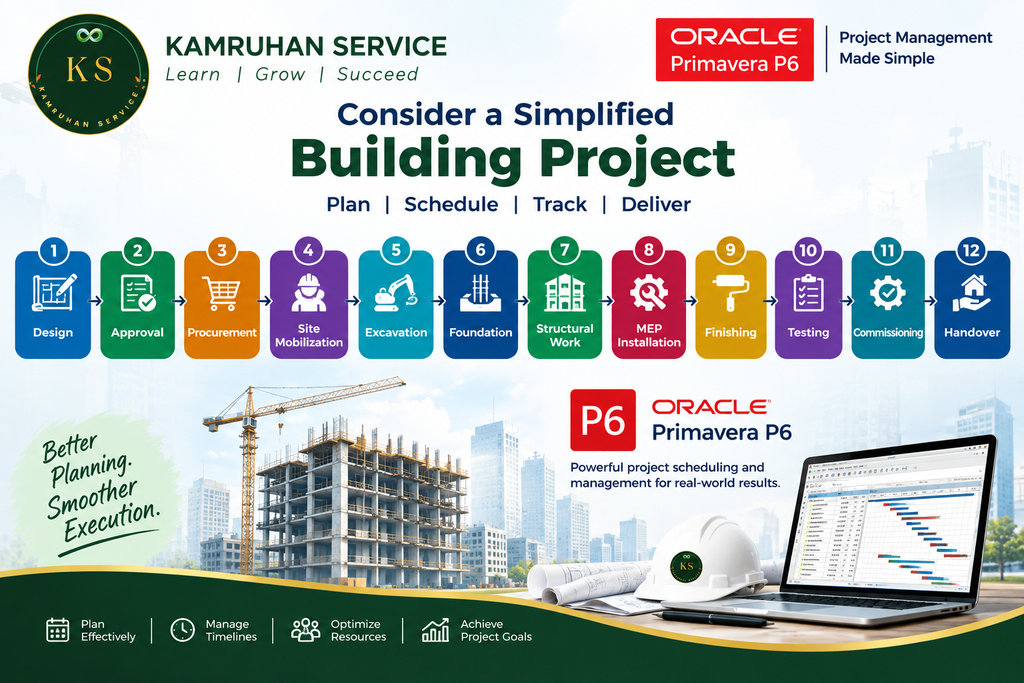
Each stage contains multiple activities.
Some activities can run in parallel, while others depend on the completion of previous work.
The planner needs to develop logical relationships, assign durations and calendars, analyze the schedule, and monitor progress.
This example demonstrates why project management is well understood using Primavera P6 , i.e. , one should be learn all concepts all together rather than separately.
Skills You Can Develop Through Primavera P6 Training @ Kamruhan
A structured training program can help learners develop knowledge in:
- Project planning
- Project scheduling
- WBS development
- Activity creation
- Activity relationships
- CPM scheduling
- Critical path analysis
- Float analysis
- Calendar management
- Baseline creation
- Progress updating
- Resource loading
- Resource planning
- Schedule monitoring
- Delay identification
- Schedule comparison
- Project reporting
- Project controls fundamentals
These skills can complement technical knowledge gained through engineering, construction, procurement, commercial, or project management experience.
Project Management via Primavera P6 Training @ Kamruhan
At Kamruhan, we focus on helping learners understand Primavera P6 from a practical project-planning perspective.
The training can be structured around the complete project scheduling workflow rather than isolated software features.
The learning journey can include:
Learn
Understand project management, planning, scheduling, WBS, activities, relationships, CPM, resources, and baselines.
Practice
Create project structures, activities, relationships, calendars, resources, and schedules.
Apply
Work through practical project scenarios and understand how schedule decisions affect project execution.
Analyze
Review critical paths, float, progress, delays, baseline comparisons, and schedule performance.
Report
Learn how project information can be organized and presented for project stakeholders.
This approach helps connect classroom learning with the type of structured thinking required in project planning and project controls.
Frequently Asked Questions
1. What is Primavera P6 used for?
Primavera P6 is used for project planning, scheduling, project control, resource management, progress monitoring, and related project management activities. Oracle describes P6 Professional as a multiproject planning and control solution supporting WBS, CPM scheduling, resource leveling, and other project management capabilities.
2. Is Primavera P6 useful for civil engineers?
Yes. Civil engineers working in construction and infrastructure can use Primavera P6 skills for project planning, scheduling, progress monitoring, and coordination.
3. Do I need project experience before learning Primavera P6?
Not necessarily. Beginners can start by learning basic project management and scheduling concepts before progressing into practical Primavera P6 exercises.
4. What is CPM in Primavera P6?
CPM stands for Critical Path Method. It is a scheduling technique used to analyze activity sequences and identify the path that determines the calculated project completion date.
5. What is a baseline in project management?
A baseline is an approved reference plan against which actual project performance can be compared.
6. Can Primavera P6 be used for resource planning?
Yes. P6 Professional provides resource management functionality, including resource pools, resource assignments, calendars, availability, and resource planning.
7. Is Primavera P6 only for construction projects?
No. Primavera P6 is used in various project environments. Its planning and scheduling concepts can be applied to construction, engineering, infrastructure, EPC, industrial, manufacturing, and other project-based environments.
Conclusion: Build Strong Project Management Skills with Primavera P6
Effective project management requires more than completing individual tasks. Projects need structured planning, logical scheduling, resource coordination, progress monitoring, schedule analysis, and continuous control.
Primavera P6 provides a professional environment for developing and managing project schedules. Its capabilities include WBS, CPM scheduling, resource management, scheduling, baselines, and reporting, making it particularly relevant to planning and project control workflows.
However, learning the software is only one part of becoming a capable planning professional. The real value comes from understanding how project management principles are translated into a practical project schedule.
With Project Management via Primavera P6 Training @ Kamruhan, learners can build knowledge progressively—from project planning fundamentals and WBS to activities, relationships, CPM, resources, baselines, progress updates, schedule analysis, and reporting.
Whether you are an engineering student, graduate, planning engineer, project professional, or someone looking to develop project scheduling skills, a structured learning approach can help you build a stronger foundation.
Learn → Practice → Apply → Analyze → Grow