
Project Management Skills is no longer limited to creating a project schedule or tracking a list of activities. Modern project professionals increasingly need to understand planning, scheduling, contracts, project data, reporting, automation, and digital tools to support projects from initiation to completion.
A strong project-management skillset can therefore be viewed as a combination of several connected capabilities:
Project Management Skills Fundamentals → Planning & Scheduling → Tendering & Contracting → Digital Applications → Data Analysis & Reporting → Project Controls → Project Delivery
Tools and subjects such as Primavera P6, Microsoft Project to Planner, Tendering & Contracting, Oracle APEX, and Excel with AI can contribute to different parts of this broader capability.
For example, Primavera P6 is designed for project planning, scheduling, resource management, and project controls, while Microsoft Project provides capabilities for tasks, dependencies, calendars, resources, baselines, critical paths, and scheduling.
Oracle APEX adds a different dimension: it is a low-code platform for developing data-driven business applications, while Excel with AI can support analysis, reporting, calculations, dashboards, and decision support.
This is where practical, integrated learning becomes valuable.
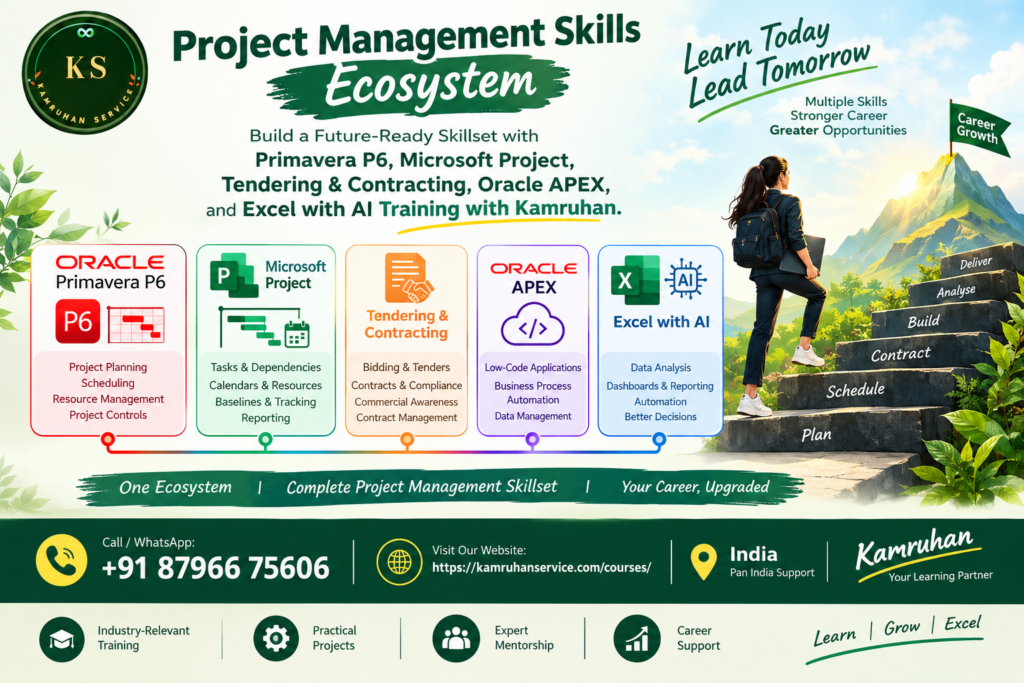
At Kamruhan, the project management skills help learners understand how these skills can fit together rather than treating every software tool as an isolated subject.
Why Are Project Management Skills Important?
Every project has objectives, timelines, resources, costs, stakeholders, risks, dependencies, and deliverables.
A project professional may therefore need to answer questions such as:
- What needs to be delivered?
- What activities are required?
- How should the activities be sequenced?
- Which activities are critical?
- What resources are required?
- What happens if an activity is delayed?
- How does procurement affect the schedule?
- What contractual requirements must be considered?
- How should progress be measured?
- How can project information be analysed?
- How should management reports be prepared?
- Where can technology and automation improve the process?
These are not simply software questions.
They are project-management questions.
Software becomes much more useful when the professional understands the underlying project logic.
The Project Management Skills Ecosystem
A practical way to understand modern project management is to divide it into five connected areas:
1. Project Planning & Scheduling
Primavera P6 + Microsoft Project to Planner
2. Commercial & Contract Understanding
3. Digital Application Development
4. Data Analysis & Reporting
5. Project Controls & Decision Support
Integrated use of planning, contracts, data, and reporting
Together, these capabilities can help learners understand the project lifecycle more comprehensively.
1. Primavera P6: Building Strong Planning & Scheduling Skills
Primavera P6 is closely associated with professional project planning and scheduling, particularly for complex projects and project-controls environments.
Oracle describes Primavera P6 EPPM as a solution for planning, managing, and executing projects, programs, and portfolios, with capabilities including CPM scheduling and resource management.
The important point, however, is that learning P6 should not mean simply learning where to click.
A professional planner needs to understand why the schedule behaves the way it does.
Important Primavera P6 concepts include:
- EPS and project structures
- WBS development
- Activity creation
- Activity durations
- Activity relationships
- Calendars
- Constraints
- Critical Path Method
- Float
- Resources
- Baselines
- Data Date
- Progress updating
- Schedule analysis
- Variance analysis
- Look-ahead planning
- Reporting
- Project controls
Oracle’s current P6 documentation specifically covers scheduling projects, critical paths, float paths, and project scheduling options.
The real learning progression
A learner can move through:
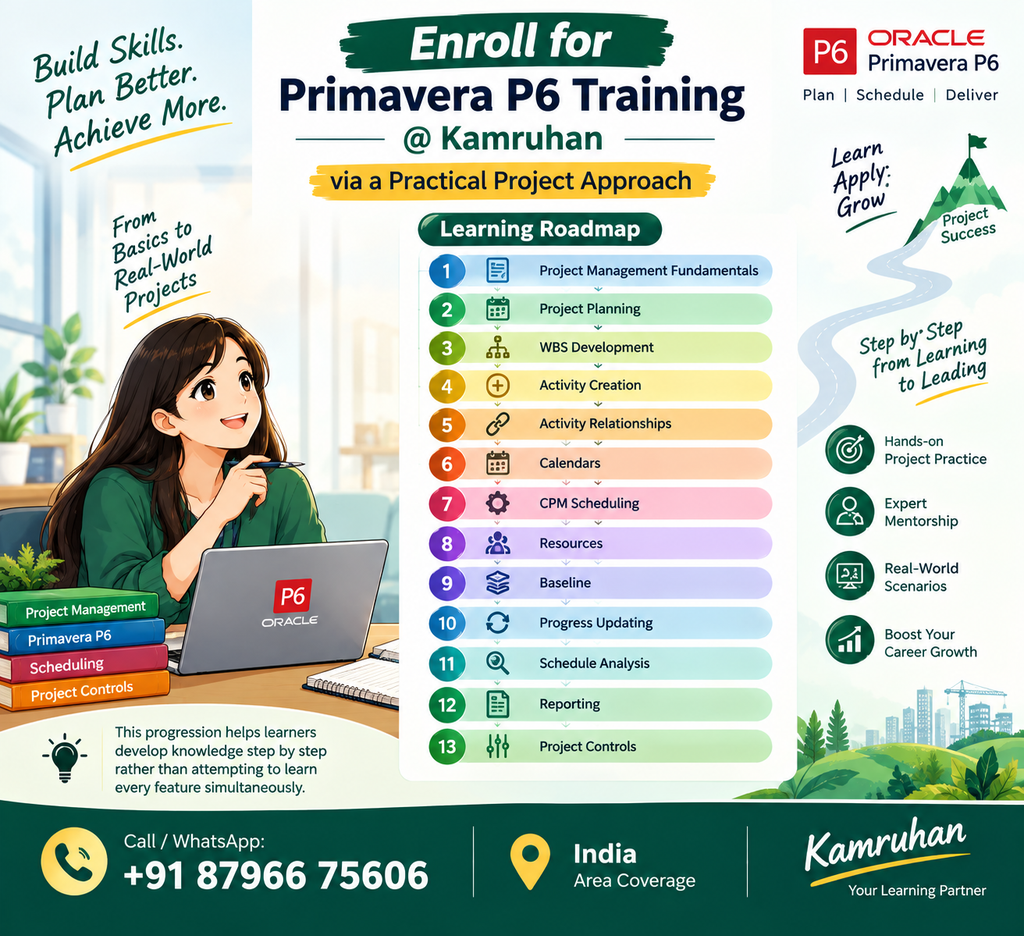
Project Management Skills Fundamentals
↓
This step-by-step approach helps learners develop project-planning logic before attempting to master advanced software functionality.
2. Microsoft Project to Planner: Practical Scheduling for Project Teams
Microsoft Project to Planner provides another environment for developing project scheduling skills.
Microsoft’s documentation covers tasks, WBS codes, task relationships, calendars, resources, critical paths, baselines, slack, and scheduling.
For learners, Microsoft Project to Planner can help demonstrate how project information is translated into a working schedule.
A typical process can include:
Project Objective
↓
Tasks
↓
Task Durations
↓
Dependencies
↓
Resources
↓
Calendar
↓
Schedule
↓
Baseline
↓
Progress
↓
Variance
↓
Reporting
One of the most important concepts is understanding relationships between activities.
Changing one activity can affect other activities depending on their relationships, constraints, calendars, durations, and other scheduling factors. Microsoft itself explains that task links, constraints, calendars, resources, and float influence how schedules behave.
This is why learning scheduling software should go beyond memorising commands.
3. Primavera P6 + Microsoft Project to Planner : Why Learn Both?
Primavera P6 and Microsoft Project to Planner are different software environments, but the underlying project management skills conceptually overlap.
Both project management skills can help professionals understand:
- Task/activity planning
- Project sequencing
- Dependencies
- Scheduling
- Calendars
- Resources
- Baselines
- Progress
- Critical activities
- Schedule analysis
- Reporting
The objective should not be to learn two tools simply to increase the number of software names on a résumé.
Instead, the value comes from understanding project planning concepts across different scheduling environments.
For example, a professional who understands activity relationships should understand the planning logic whether working in P6 or Microsoft Project to Planner.
That creates a more transferable understanding of project scheduling.
4. Tendering & Contracting: Understanding the Commercial Side
Project management skills schedules do not exist independently of contracts.
Projects are often governed by:
- Scope of work
- Technical specifications
- Contract conditions
- Tender requirements
- Deliverables
- Milestones
- Payment terms
- Performance obligations
- Change management
- Documentation
- Compliance requirements
This makes Tendering & Contracting an important complementary area for project professionals.
A planner may understand the schedule, but commercial and contractual awareness can help the professional understand what the project is actually required to deliver and under what conditions.
Tendering knowledge can include:
- Understanding tender documents
- Scope interpretation
- BOQ awareness
- Technical requirements
- Commercial requirements
- Bid preparation concepts
- Evaluation considerations
- Submission requirements
- Contract documentation
Contracting knowledge can include:
- Contract structure
- Roles and responsibilities
- Deliverables
- Milestones
- Variations
- Claims awareness
- Documentation
- Time-related obligations
- Payment-related provisions
- Contract administration concepts
The combination can create a stronger connection between:
What was contracted → What was planned → What is being executed → What is actually being delivered
5. Oracle APEX: Bringing Digital Applications into Project Management Skills
Project management skills environment generates significant amounts of information.
Consider the data generated by:
- Project activities
- Procurement
- Materials
- Resources
- Documents
- Issues
- Risks
- Progress
- Quality
- Costs
- Approvals
- Reports
A project team may eventually need applications to capture, organise, process, and present this information.
This is where Oracle APEX can provide a different type of skill.
Oracle describes APEX as a low-code platform for rapidly building secure and scalable applications, with browser-based development, data-centric functionality, and integration with Oracle Database.
How can APEX relate to project management skills environment?
Depending on the organisation and use case, low-code applications can potentially support processes such as:
- Project issue tracking
- Approval workflows
- Data collection
- Project dashboards
- Resource information
- Document-related workflows
- Status reporting
- Internal project applications
- Business process automation
The key concept is not that every project manager needs to become a software developer.
Rather, understanding digital application possibilities can help project professionals communicate better with technology teams and identify opportunities for process improvement.
6. Excel with AI: Turning Project Data into Insights
Excel remains highly relevant to project management skills work because project teams frequently deal with structured data.
A project professional may work with:
- Activity data
- Cost data
- Resource data
- Procurement data
- Progress data
- KPI data
- Variance data
- Forecasts
- Status reports
Traditional Excel skills such as formulas, tables, lookups, sorting, filtering, charts, pivot tables, and data analysis remain useful.
Adding AI capabilities can further support productivity by helping users work with data, generate formulas, explore patterns, prepare summaries, and accelerate routine analytical tasks—subject to the capabilities of the specific Microsoft 365/Excel environment being used.
Practical Excel + AI applications can include:
Data → Clean → Analyse → Visualise → Explain → Report
For example:
Raw Project Data
↓
Data Cleaning
↓
Formula / Analysis
↓
Pivot Tables
↓
Dashboard
↓
Variance Analysis
↓
Management Report
This connects data analysis directly with project management skills decision making.
7. How These Project Management Skills Work Together
The real value appears when the skills are viewed as a connected ecosystem.
Imagine a construction, engineering, infrastructure, IT, or business project.
Step 1 — Project Management Skills
Understand:
- Scope
- Objectives
- Deliverables
- Stakeholders
- Risks
- Timeline
Step 2 — Planning
Break the project into:
- WBS
- Activities
- Milestones
- Dependencies
- Durations
Step 3 — Scheduling
Use:
Primavera P6 / Microsoft Project to Planner
to develop and manage the project schedule.
Step 4 — Commercial Understanding
Use:
Tendering & Contracting
knowledge to understand contractual scope, obligations, milestones, and commercial requirements.
Step 5 — Data Management
Use:
Excel
to analyse project information and prepare reports.
Step 6 — Digital Process Improvement
Use:
Oracle APEX
where appropriate to support application-based workflows and data-driven processes.
Step 7 — Project Controls
Bring the information together for:
- Progress monitoring
- Schedule analysis
- Variance analysis
- Reporting
- Decision support
- Management visibility
This creates a broader project management skills capability.
From Software Operator to Project Professional
There is an important difference between knowing software and understanding project management.
A software operator may know how to:
Create an activity.
A project professional should also understand:
Why does the activity exist?
What is its predecessor?
What is its successor?
Is it critical?
What is its float?
What happens if it is delayed?
Which resource is required?
Does the contract impose a milestone?
How will the delay affect project completion?
How should the impact be reported?
This deeper understanding is what turns software knowledge into project management capability.
A Practical Career Learning Roadmap
For someone beginning or strengthening a project-management career, a structured roadmap can be:
Level 1 — Fundamentals
Project Management Skills Concept
↓
Level 2 — Planning
WBS + Activities + Dependencies
↓
Level 3 — Scheduling
Primavera P6 + Microsoft Project to Planner
↓
Level 4 — Commercial Understanding
Tendering & Contracting
↓
Level 5 — Data Skills
Excel + AI + Reporting
↓
Level 6 — Digital Applications
Oracle APEX
↓
Level 7 — Project Controls
Progress + Schedule Analysis + Reporting
↓
Level 8 — Professional Growth
Planning Engineer → Project Controls → Project Management
This does not mean every learner must master every area to the same depth. The appropriate combination depends on the person’s role, industry, project environment, and career objectives.
Who Can Benefit from These Project Management Skills?
This integrated learning approach can be relevant to:
- Engineering graduates
- Civil engineers
- Mechanical engineers
- Electrical engineers
- Planning engineers
- Project planners
- Project coordinators
- Scheduling professionals
- Project controls professionals
- Site engineers
- Quantity surveying professionals
- Contract professionals
- Procurement professionals
- Project managers
- Working professionals seeking project management skills
- Professionals transitioning into planning and project controls
For beginners, the recommended approach is to start with project management skills basics before moving into advanced scheduling or digital applications.
Why Practical Learning Matters
Project management skills is easier to understand when concepts are connected to realistic project situations.
Instead of learning:
“This is a scheduling feature.”
learn:
“What project problem does this feature help solve?”
For example:
Situation:
A procurement package is delayed.
Project question:
Which downstream activities could be affected?
Scheduling question:
What relationships exist between the procurement activity and installation activities?
P6 / Microsoft Project to Planner question:
How does the change affect the schedule?
Data question:
What does the progress and variance data show?
Management question:
What needs management attention?
Reporting question:
How should the impact be communicated?
This type of learning connects software → project logic → data → decision-making.
Kamruhan: Learn, Grow & Excel
At Kamruhan, the focus can be viewed around a practical learning philosophy:
Learn → Practise → Apply → Analyse → Grow
Rather than treating Project Management, Primavera P6, Microsoft Project, Tendering & Contracting, Oracle APEX, and Excel with AI as unrelated subjects, learners can understand how each area contributes to a broader professional capability.
The objective is to develop practical understanding that can be applied to project environments.
Key learning areas include:
Project Management Skills
Understand project objectives, planning, execution, monitoring, and control.
Primavera P6
Develop planning, scheduling, CPM, baseline, progress, and project-controls knowledge.
Microsoft Project-To-Planner
Build practical scheduling and project management skills .
Tendering & Contracting
Understand tender documents, commercial requirements, contract concepts, and project obligations.
Oracle APEX
Explore low-code application development and data-driven business solutions.
Excel with AI
Strengthen data analysis, reporting, automation, and productivity skills.
The Complete Picture
A modern project professional can benefit from seeing the bigger picture:
PROJECT MANAGEMENT
↓
PLAN
↓
SCHEDULE
↓
CONTRACT
↓
EXECUTE
↓
COLLECT DATA
↓
ANALYSE
↓
REPORT
↓
CONTROL
↓
DELIVER
Primavera P6 and Microsoft Project support the planning and scheduling dimension.
Tendering & Contracting supports the commercial and contractual dimension.
Oracle APEX supports digital application and workflow possibilities.
Excel with AI supports data analysis and reporting.
And Project Management connects all these areas through planning, coordination, monitoring, communication, and decision-making.
Conclusion: Build a Complete Project Management Skillset
Project Management Skills are much broader than learning one software application.
A strong professional foundation can combine:
Project Management + Primavera P6 + Microsoft Project-To-Planner + Tendering & Contracting + Oracle APEX + Excel with AI
The purpose is not simply to collect software certifications.
It is to understand how projects are planned, scheduled, contracted, monitored, analysed, reported, and controlled.
For an engineering graduate, these skills can provide a structured pathway toward planning and project-oriented roles. For an experienced professional, they can help expand existing project knowledge into areas such as project controls, commercial understanding, data analysis, and digital process improvement.
The most effective learning journey is therefore not:
“Learn every tool at once.”
It is:
“Understand the project → Learn the right tool → Practise with realistic scenarios → Analyse the results → Apply the knowledge.”
That is the foundation of practical project-management learning.
Ready to Build Your Project Management Skillset?
Explore Project Management, Primavera P6, Microsoft Project-To-Planner, Tendering & Contracting, Oracle APEX, and Excel with AI training with Kamruhan.
Learn | Grow | Excel
📞 Call / WhatsApp: +91 87966 75606